Understanding React Virtual DOM: How React Updates UI Efficiently

Modern web applications update the UI constantly — typing in inputs, receiving notifications, filtering lists, animations, and more. If every small change directly manipulated the browser DOM, applications would quickly become slow and inefficient.
This is exactly the problem React’s Virtual DOM solves.
In this article, we’ll understand:
What problem the Virtual DOM solves
Real DOM vs Virtual DOM
How React renders components
What happens when state changes
Diffing and reconciliation
How React updates only changed elements
Why React apps feel fast
The complete React render → diff → commit flow
The Problem: Direct DOM Manipulation Is Expensive
The browser’s Real DOM is not cheap to update.
Operations like:
Adding elements
Removing nodes
Updating styles
Recalculating layouts
Repainting pixels
all require work from the browser engine.
When updates happen frequently, direct DOM manipulation becomes slow.
Imagine updating 1,000 list items every time a user types a character.
Without optimization:
document.getElementById("title").innerText = "New Title";
Repeated DOM operations can trigger:
Reflow
Repaint
Layout recalculation
This affects performance heavily.
What Is the Real DOM?
The Real DOM is the actual tree structure rendered by the browser.
Example:
<div>
  <h1>Hello</h1>
  <button>Click</button>
</div>
The browser converts this into a DOM tree internally.
Problems With Frequent Real DOM Updates
Updating the Real DOM repeatedly is expensive because:
| Problem | Reason |
|---|---|
| Slow updates | Browser recalculates layout |
| Repaint cost | Pixels must be redrawn |
| Complex tree traversal | Large apps have huge DOM trees |
| UI lag | Frequent updates block rendering |
React avoids unnecessary Real DOM operations using the Virtual DOM.
What Is the Virtual DOM?
The Virtual DOM (VDOM) is a lightweight JavaScript representation of the Real DOM.
Instead of updating the browser directly, React first updates this virtual copy.
Example Virtual DOM object:
{
  type: "div",
  props: {
    children: [
      {
        type: "h1",
        props: {
          children: "Hello"
        }
      }
    ]
  }
}
This is just a JavaScript object — very fast to create and compare.
Real DOM vs Virtual DOM
| Real DOM | Virtual DOM |
|---|---|
| Actual browser structure | Lightweight JS object |
| Expensive to update | Cheap to create/update |
| Causes repaint/reflow | No browser rendering cost |
| Slow frequent updates | Efficient diffing |
| Direct manipulation | React computes minimal changes |
React Initial Render Process
When a React app renders for the first time, this happens:
Step 1: Component Executes
function App() {
  return <h1>Hello React</h1>;
}
React calls the component function.
Step 2: Virtual DOM Tree Is Created
React converts JSX into Virtual DOM objects.
<h1>Hello React</h1>
becomes something conceptually similar to:
{
  type: "h1",
  props: {
    children: "Hello React"
  }
}
Step 3: Real DOM Nodes Are Created
React converts the Virtual DOM into actual browser DOM elements.
The browser finally displays:
<h1>Hello React</h1>
Initial Render Flow
Component
   ↓
Virtual DOM Created
   ↓
React Converts to Real DOM
   ↓
Browser Paints UI
What Happens When State Changes?
Suppose we have:
function Counter() {
  const [count, setCount] = useState(0);

  return <h1>{count}</h1>;
}
When:
setCount(1);
is called, React does NOT immediately manipulate the browser DOM directly.
Instead, React starts a new render cycle.
React Re-render Process
When state or props change:
Component function runs again
A new Virtual DOM tree is created
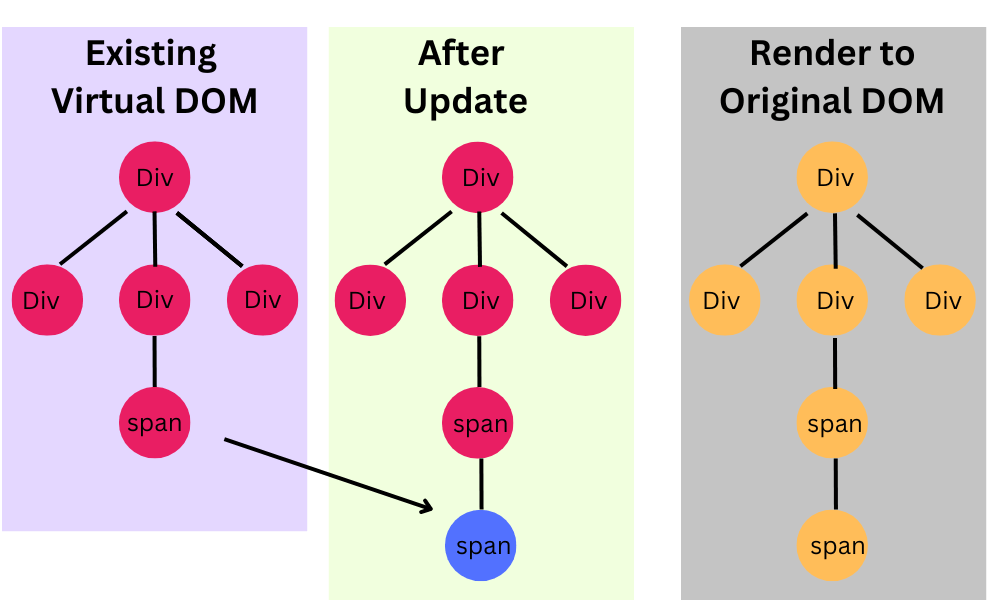
React compares old vs new tree
React finds minimal changes
Only changed DOM nodes are updated
Creating a New Virtual DOM Tree
Before update:
<h1>0</h1>
New render after state update:
<h1>1</h1>
React now has:
Old Virtual DOM tree
New Virtual DOM tree
Next comes the important part:
Diffing
What Is Diffing?
Diffing means comparing:
Previous Virtual DOM tree
New Virtual DOM tree
to determine what changed.
This comparison process is called:
Reconciliation
React tries to answer:
“What is the minimum amount of Real DOM work needed?”
Reconciliation Explained Simply
React compares both trees node by node.
Example:
Before:
<h1>0</h1>
After:
<h1>1</h1>
React sees:
Same element type (
h1)Only text content changed
So React updates only the text node.
Instead of replacing the entire element.
Old Tree vs New Tree
Old Tree                New Tree

<h1>0</h1>      →       <h1>1</h1>
React computes:
Change only text content
How React Finds Minimal Changes
React uses heuristics to optimize comparison.
Some important rules:
1. Different Element Types
<div />
to
<span />
React replaces the entire node.
2. Same Element Type
<h1 className="a" />
to
<h1 className="b" />
React updates only changed attributes.
3. Children Comparison
For lists, React compares child elements intelligently.
This is why keys are important.
items.map(item => (
  <li key={item.id}>{item.name}</li>
))
Keys help React identify moved/updated items efficiently.
Updating Only Changed Nodes
After diffing finishes, React performs minimal Real DOM operations.
Example:
Before:
<h1>0</h1>
After update:
<h1>1</h1>
React updates only:
textContent
instead of rebuilding the entire DOM subtree.
This optimization is why React performs efficiently.
Why Virtual DOM Improves Performance
The main performance benefit is:
Fewer Real DOM Operations
React:
batches updates
compares trees in memory
updates only necessary nodes
Since JavaScript object comparison is faster than browser DOM manipulation, applications remain responsive.
Important Clarification
Virtual DOM itself is not magically faster than the Real DOM.
The real advantage is:
Minimizing unnecessary browser updates.
React reduces expensive DOM work intelligently.
React Render → Diff → Commit Flow
Here’s the complete mental model.
1. Render Phase
React executes components and creates a new Virtual DOM tree.
Component Runs
      ↓
New Virtual DOM Generated
2. Diff Phase (Reconciliation)
React compares:
Old Virtual DOM
New Virtual DOM
and calculates changes.
Old Tree vs New Tree
        ↓
Minimal Differences Found
3. Commit Phase
React applies only required updates to the Real DOM.
Update Changed Nodes Only
        ↓
Browser Paints Changes
Complete Lifecycle Flow
State / Props Change
          ↓
Component Re-renders
          ↓
New Virtual DOM Created
          ↓
Diffing (Reconciliation)
          ↓
Minimal Changes Calculated
          ↓
Real DOM Updated
          ↓
Browser Repaints Updated UI
Visualizing the Entire Flow
Initial Render
React Component
       ↓
Virtual DOM Tree
       ↓
Real DOM
       ↓
Screen UI
Update Flow
State Change
      ↓
New Virtual DOM
      ↓
Compare with Old Virtual DOM
      ↓
Find Differences
      ↓
Apply Minimal DOM Updates
      ↓
Updated UI
Why React Feels Fast
React apps feel smooth because React avoids unnecessary work.
Instead of rebuilding the entire page:
No -> Replace everything Yes-> Update only what changed
This leads to:
Faster UI updates
Better responsiveness
Efficient rendering
Scalable frontend applications
Mental Model to Remember
Think of React as:
UI = Function(State)
Whenever state changes:
React creates a new UI description
Compares it with the previous one
Updates only the differences
That’s the essence of the Virtual DOM.
Final Thoughts
The Virtual DOM is one of React’s most important concepts because it allows React to build highly interactive applications efficiently.
The key takeaway is:
React does not blindly update the browser DOM.
Instead, React:
creates Virtual DOM trees
compares old vs new versions
calculates minimal changes
updates only necessary nodes
This render → diff → commit approach is what makes React performant and developer-friendly.
Suggested Diagrams for Your Hashnode Article
1. Initial Render
Component → Virtual DOM → Real DOM
2. State Update Flow
State Change
    ↓
New Virtual DOM Tree
3. Diffing Visualization
Old Tree ↔ New Tree
Highlight changed nodes.
4. Minimal Patch Update
Only Changed Nodes Updated
5. Full React Lifecycle
Render → Diff → Commit
Conclusion
Understanding the Virtual DOM gives you the foundation to understand:
React rendering
Re-renders
Performance optimization
Memoization
Keys
Reconciliation
React internals
And most importantly:
It helps you build a correct mental model of how React updates UI efficiently.
Comments
Join the discussionNo comments yet. Be the first to comment.
